

How to Test IPTV During a Free Trial: A Complete Checklist
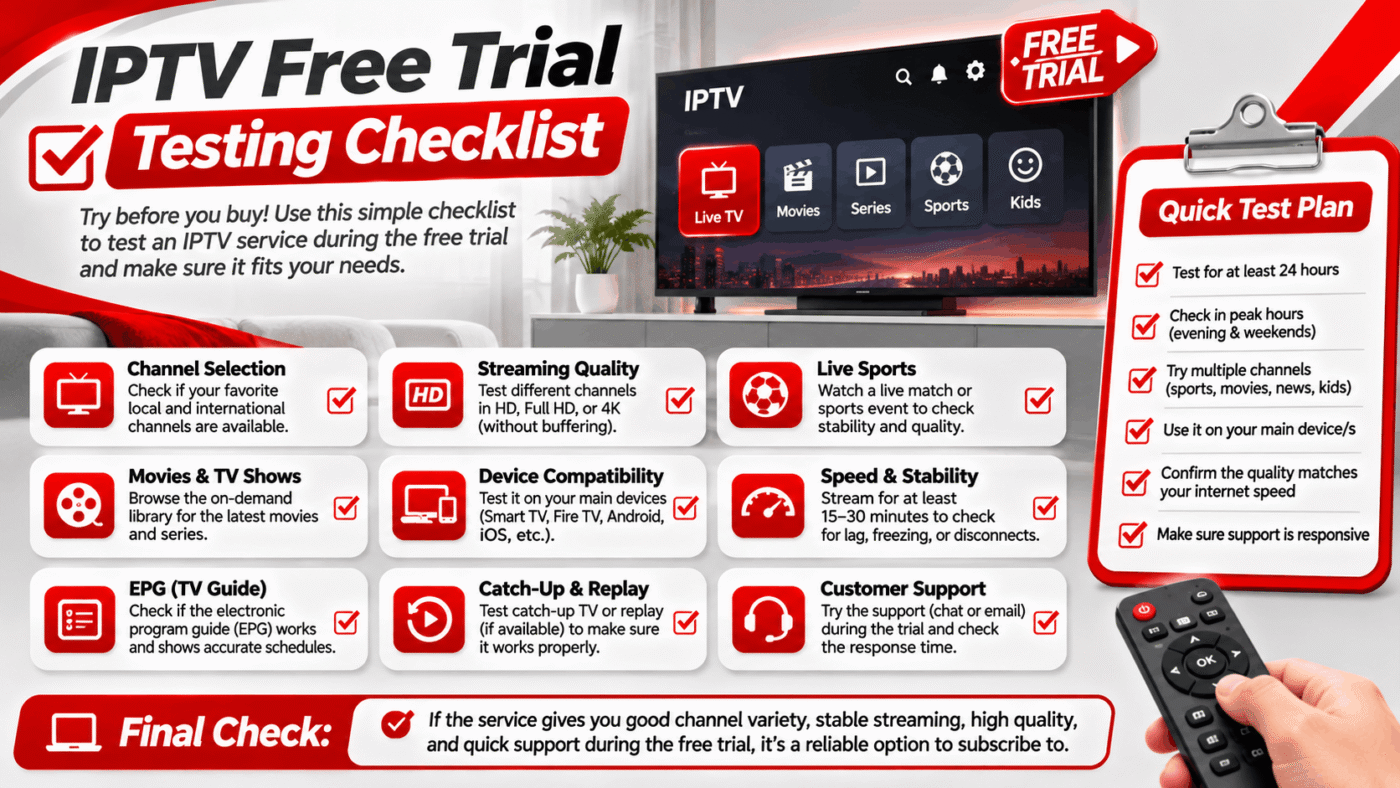
An IPTV free trial gives you a chance to check a service before paying for a subscription. But simply opening a few channels is not enough to judge whether it is worth buying. Test your preferred live TV channels, movies and series, picture quality, buffering, device compatibility, electronic programme guide (EPG), channel switching and customer support.
The best way to test IPTV during a free trial is to use your normal device and internet connection, check the service at different times of the day, and record any problems. You should also review the paid subscription terms, including the price, duration, connection limit, and refund policy, before making a decision.
This guide explains what to test, how to test it, and which warning signs to look for before purchasing an IPTV subscription.
Before You Start: Prepare for Your IPTV Free Trial
A little preparation can help you use your trial time properly. Before testing, make sure you have:
- A compatible Smart TV, Fire TV Stick, Android device, Apple device, or computer.
- A stable internet connection.
- The IPTV login details supplied by the trial provider.
- A compatible IPTV player application.
- A list of your preferred channels, movies and programmes.
- Enough time to test the service during your usual viewing hours.
One important point is the difference between an IPTV service and an IPTV player application.
The IPTV service provides access to the available channels and content under its subscription or trial terms.
The IPTV player is the application you use to connect to that service and play its streams. Installing a player does not automatically give you access to television channels.
Use the application recommended by your provider or another compatible player from a trusted source. Do not download unknown files or share your login details and private playlist URLs publicly.
If you need help with the setup process, follow an IPTV installation guide for your device.
IPTV Free Trial Checklist – What Should You Test?
This is the most important part of your evaluation. Work through each test instead of judging the service after watching only one or two channels.
1. Test Your Preferred Live TV Channels
Start with the channels you actually watch. A service may advertise a large channel collection, but that number does not tell you whether your preferred content is available.
Check:
- Are your preferred channels listed?
- Are relevant Canadian, regional, and language categories available?
- Do the channels open successfully?
- Are channel names and categories easy to understand?
- Do the channels you regularly watch play consistently?
How to test: Make a list of 10–15 channels that matter to you. Search for each channel, open it, and watch for a few minutes. Record missing channels, playback errors, and repeated interruptions.
Do not judge a service only by its advertised channel count. The availability and performance of the channels you use are more important.
2. Test Movies and TV Series (VOD)
If you plan to watch movies and series, check the video-on-demand (VOD) section as well as live television.
Check:
- Are the movies and series you want available?
- Are titles arranged into useful categories?
- Does the search function work?
- Do available descriptions and artwork load?
- Can you start movies and episodes successfully?
- Are audio and subtitle options available where advertised?
How to test: Search for several titles from different genres. Open a few available movies and episodes, test playback, and check how seasons and episodes are arranged.
Do not assume that a specific title must be included. Content catalogues can change, and availability may depend on the provider’s content rights and current offering.
3. Check Picture and Audio Quality
A stream may open successfully but still have poor picture or sound quality. Check both during actual playback.
Check:
- Is the picture clear?
- Does the stream offer the resolution you want?
- Does picture quality remain consistent?
- Is the audio clear?
- Do sound and video stay in sync?
- Are subtitles available when needed?
How to test: Use a television or display that supports the resolution you want to check. Open several streams labelled with the relevant quality, where available. Compare picture clarity and listen for audio problems.
Remember that a label such as HD or 4K does not prove that the stream is delivered at that native resolution or maintains a consistent bitrate. Your device, display, source and connection can all affect the result.
4. Test Buffering, Freezing and Playback Stability
Buffering and freezing can interrupt a film, programme or live event. Use the trial to see whether these problems occur under your normal viewing conditions.
Check:
- Does playback pause unexpectedly?
- Does the stream freeze?
- Does the picture repeatedly stop and resume?
- Does audio continue when the picture freezes?
- Do problems affect every channel or only selected streams?
How to test: Watch several different streams for a reasonable period. Test during your usual viewing hours, then repeat at another time of day. If possible, compare Wi-Fi with a wired Ethernet connection.
If buffering happens, check whether it affects one channel or several. Your internet connection, Wi-Fi signal, device performance, network congestion, and individual stream availability can all play a role.
A short trial cannot guarantee future performance under every network condition. It can only show how the service performs during the tests you complete.
5. Check Channel Switching Speed
Channel switching is part of everyday viewing. If you regularly move between news, sports and entertainment channels, repeated loading delays can make the service frustrating.
Check:
- How quickly does a selected channel begin playing?
- Does the player repeatedly show a loading screen?
- Can you move between different channel categories?
- Does switching channels cause application errors?
How to test: Switch between several channels, including channels from different categories. Repeat the process a few times and note whether delays are consistent.
There is no single switching time that applies to every IPTV service. Results depend on the application, device, internet connection and stream source.
6. Test the Electronic Programme Guide (EPG)
An electronic programme guide displays information about current and upcoming television programmes. It can help you find something to watch without opening every channel.
Check:
- Does the programme guide load?
- Are programme names displayed?
- Are current and upcoming programmes shown?
- Do the displayed times appear correct?
- Can you move between channels and time slots?
How to test: Open the guide for several channels. Compare the displayed programme information with the actual programming.
Some channels may have incomplete listings even when their streams work. EPG accuracy depends on the guide data supplied and how the IPTV application processes it.
For more details, read the guide to EPG for IPTV.
7. Test the Service on Your Intended Device
A successful test on one device does not automatically mean the same setup will work on another.
For example, an IPTV service may work on your Android phone but have a compatibility issue with your particular Smart TV model or operating system.
Check:
- Does the application install and open?
- Can you enter your supplied login details?
- Does the channel list or playlist load?
- Is navigation comfortable on your device?
- Does playback work on the device you plan to use after subscribing?
How to test: Use the actual television, streaming stick, phone or computer you intend to use regularly. Do not rely only on a test completed on another device.
8. Check the Application Experience
The IPTV application affects how easily you can browse and watch content. A service may provide the channels you want, but a confusing player can make daily use difficult.
Check:
- Is the interface easy to navigate?
- Can you search for channels and content?
- Can you mark favourites, if supported?
- Does the application remember useful settings?
- Do playback controls respond properly?
- Does the app crash or close unexpectedly?
Also remember that some features belong to the player rather than the IPTV subscription. Search, favourites, interface layout and playback controls can vary between applications.
9. Test Login and Account Access
Your login details should work correctly throughout the trial period.
Check:
- Do the supplied credentials work?
- Does the account load successfully?
- Can you reopen the application without repeatedly entering your details?
- Do unexpected login errors appear?
- Is the trial expiry time clear?
How to test: Log in using the supplied instructions, close the application and open it again. Check whether the account remains accessible as expected.
Never post your password, playlist URL or private account information in public groups. Share access details only through the intended service or application.
10. Check the Number of Simultaneous Connections
Do not confuse device compatibility with the number of devices allowed to stream at the same time.
These are three different things:
- Compatible devices: Devices on which the application or service can work.
- Installed applications: Devices where you have installed the IPTV player.
- Simultaneous connections: Devices allowed to play streams at the same time under your account.
How to test: Ask the provider to confirm the connection limit. If the trial terms permit it, test the service on the number of devices you expect to use.
For example, Pro IPTV Canada’s published trial information states that streaming is limited to one device at a time. This means device compatibility should not be confused with permission to watch on multiple screens simultaneously. Check the current terms before subscribing.
11. Test Customer Support
Customer support matters when you experience login, installation or playback problems.
Check:
- Is it clear how to contact support?
- Does the listed contact method work?
- Are the instructions easy to understand?
- Can the team explain setup or login problems?
- Are the answers useful and relevant?
How to test: Ask a genuine question about device compatibility, installation or subscription terms. Pay attention to whether the answer solves your question, not only how quickly you receive a reply.
Useful support should explain what to do and help you understand the problem. A quick but unclear response is not enough.
12. Review Subscription Plans and Terms Before Paying
Do not wait until the trial expires to find out what a paid subscription includes. Review the terms before making your decision.
Check:
- Subscription duration.
- Total price and payment methods.
- Simultaneous connection allowance.
- Renewal and expiry conditions.
- Cancellation terms.
- Refund policy.
- Customer support availability.
- Content and service limitations.
Also confirm whether the trial and paid subscription have the same features and conditions. A trial may have different limits from a paid plan.
If the provider cannot explain the price, payment conditions, connection limit, or refund policy clearly, treat that as a reason to delay your purchase.
How to Test IPTV During a 24-Hour Free Trial
You do not need to watch television continuously for 24 hours. Instead, divide the trial into smaller testing periods so you can check the important features without wasting time.
| Testing period | What to test | What to record |
|---|---|---|
| First 30 minutes | Login, installation and device compatibility | Login success, setup difficulties and errors |
| Next 1–2 hours | Preferred live channels and channel switching | Missing channels, loading delays and playback |
| Next 30–60 minutes | Movies, series and search | Catalogue relevance, search and playback |
| Normal viewing hours | Streaming stability and picture quality | Buffering, freezing, audio and image quality |
| Later in the trial | EPG, app navigation and support | Guide accuracy, ease of use and support experience |
| Before trial expiry | Paid plan and subscription terms | Price, duration, connections and refund conditions |
This schedule is a suggested plan, not a requirement to use the service continuously.
For example, Pro IPTV Canada, a top IPTV provider in Canada, offers a 24-hour free IPTV trial in Canada that expires automatically. No credit card is required, and login details are delivered through WhatsApp or email. Activation typically takes 5–10 minutes. These are their trial conditions, so review all free trial information properly before requesting access.
The Complete IPTV Free Trial Testing Checklist
Use this checklist while testing any IPTV service. Tick each item only after you have completed the test.
1. Account and setup
- Received login details successfully.
- Logged into the IPTV player.
- Loaded the channel list or playlist.
- Confirmed trial expiry conditions.
- Tested setup on my intended device.
2. Content availability
- Checked my preferred live TV channels.
- Tested relevant regional and language categories.
- Searched for movies and series.
- Checked available seasons and episodes.
- Confirmed the content I care about is available.
3. Playback quality
- Checked picture clarity and available resolution.
- Checked audio quality and synchronization.
- Tested channel switching.
- Watched several streams for interruptions.
- Tested during my normal viewing hours.
4. Features and usability
- Checked EPG and programme information.
- Tested search and channel categories.
- Checked favourites and playback controls.
- Reviewed application stability.
- Checked advertised catch-up or replay features.
5. Compatibility and support
- Tested my intended streaming device.
- Confirmed simultaneous connection limits.
- Checked customer support contact methods.
- Asked a genuine setup or subscription question.
- Reviewed paid subscription terms and refund conditions.
IPTV Free Trial Scorecard: Rate the Service Before Buying
After completing the checklist, give each category a score out of five. This helps you compare your actual experience instead of relying on memory or promotional claims.
| Evaluation category | Rating out of 5 | Notes |
|---|---|---|
| Preferred content availability | /5 | |
| Streaming quality | /5 | |
| Playback stability | /5 | |
| Channel switching | /5 | |
| Device compatibility | /5 | |
| App usability | /5 | |
| EPG and guide information | /5 | |
| Customer support | /5 | |
| Subscription value and terms | /5 |
Use your own experience when assigning scores. For example, a service may score highly for channel availability but poorly for playback stability.
This scorecard is a personal decision tool, not an industry rating or a guarantee that future performance will remain the same.
Common Problems to Check During an IPTV Free Trial
If something fails during your trial, identify the likely cause before changing settings or reinstalling applications.
| Problem | What to check first | What it may indicate |
|---|---|---|
| Login details do not work | Check spelling, login URL and trial activation | Incorrect credentials or account issue |
| Channels do not load | Check internet connection and playlist loading | Network, app or source problem |
| Only certain channels fail | Test other channels | Individual stream availability issue |
| Buffering occurs | Test another stream and check the network | Network, device or source issue |
| Picture quality is poor | Check source resolution and device display | Low-quality source or playback settings |
| EPG is missing | Check guide availability and app configuration | Missing guide data or mapping problem |
| App crashes | Restart the app and check compatibility | Device or application issue |
| Support does not resolve the problem | Provide device and error details | Further technical investigation may be needed |
Start with the simplest checks. For example, if one channel does not play, test another channel before assuming the entire service is unavailable.
If the problem affects several channels, check your connection, login status and application.
For more troubleshooting guidance, read Is IPTV Down in Canada?.
Avoid repeatedly changing applications or reinstalling everything before identifying the actual problem. A new player will not necessarily fix an unavailable stream or an account issue.
Red Flags to Watch for Before Buying an IPTV Subscription
A free trial is also an opportunity to check whether a provider explains its service and subscription conditions clearly.
Be careful if:
- The provider will not explain the price or duration. You should know what you are paying and how long access lasts.
- Connection limits are unclear. Confirm how many devices can stream at the same time.
- Advertised content is missing. A channel list is not useful if the channels you need cannot be found or played.
- The provider promises guaranteed zero buffering. No service can remove every possible network, device or stream problem.
- Support details are unclear. You should know how to contact the provider when something goes wrong.
- Unnecessary sensitive information is requested. Be cautious about requests that are not needed to provide the service.
- You are asked to share private login details publicly. Keep passwords and account access information private.
- Refund and cancellation terms are missing. Understand the conditions before making a payment.
- The provider cannot explain its content rights. Ask whether it has the necessary authorisation to distribute the channels and content it offers.
A free trial does not prove that every advertising claim is accurate. Test the service and ask questions before paying.
Also, do not assume that every service using IPTV technology is automatically legal or illegal. IPTV is a way of delivering television. The provider’s rights and permissions for the content are important.
Should You Subscribe After Testing an IPTV Free Trial?
You can make a better subscription decision when you have tested the features that matter to you.
Consider subscribing only if:
- Your preferred channels and content are available.
- Picture and audio quality are acceptable.
- Playback works reliably on your normal device and connection.
- You did not experience persistent, unresolved interruptions.
- Your device and application work correctly.
- The EPG and other important features meet your needs.
- The provider has explained the connection limits and paid subscription terms.
- The price and refund conditions are acceptable.
- You are satisfied with the support experience.
If several important tests fail, ask the provider for clarification before purchasing. You may also decide that the service is not suitable for your viewing needs.
The best decision comes from your own testing results—not the advertised channel count, a promotional offer, or a promise of perfect streaming.
If you haven’t requested a trial yet, check Pro IPTV Canada’s free trial and request 24 hours of trial access. If you already have trial access, use the checklist and scorecard above before choosing a paid IPTV plan.